Blazor WebAssembly on .NET 8, 10 and 11: we measured download size and startup
We measured the default Blazor WebAssembly app on .NET 8, 10 and 11 RC2: what the browser downloads, how fast it starts, and the caching change since .NET 10.

Vlado Pandžić · Founder · Senior .NET architect
Published · 8 min read
Contents
The first question about Blazor WebAssembly is almost always the same: how much does the browser have to download before the user sees anything? The numbers floating around online are often from .NET 5 or 6. So we measured it ourselves, on the versions that matter today: .NET 8, .NET 10, and the release candidate of .NET 11.
The short answer: the default application transfers about 2.5 MB on the first visit on all three versions and is on screen in under half a second on a fast machine. The size barely changed. What did change, in .NET 10, is how repeat visits are cached, and that can quietly cost you the whole 2.5 MB on every visit.
How we measured
We kept it simple and repeatable:
- The same application: the default
dotnet new blazorwasmtemplate, created fornet8.0,net10.0andnet11.0with the .NET 11 RC2 SDK. - A normal release publish:
dotnet publish -c Release, without the optionalwasm-toolsworkload, which is how many teams publish. - Served like a real server would: a local web server that sends the Brotli-compressed files the publish step produces.
- Measured in the browser: Chromium, timing from the start of navigation until the page heading is rendered, and counting the bytes actually transferred.
- First visit: empty cache, the median of five runs. Repeat visit: with correct cache headers, the median of three runs.
- The machine: a laptop with an Intel Core Ultra 7 255H. A phone will be slower, but the differences between versions are what we were after.
The results
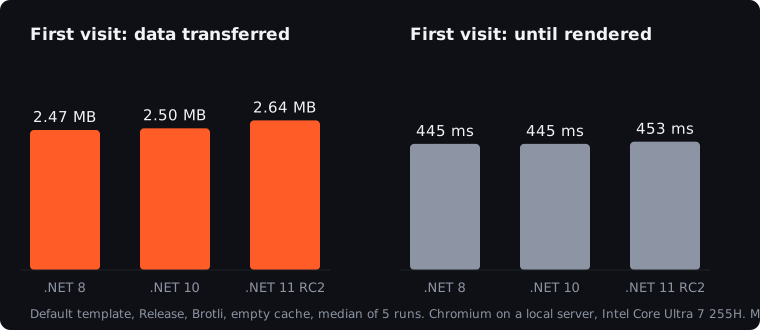
| .NET 8 | .NET 10 | .NET 11 RC2 | |
|---|---|---|---|
| Requests, first visit | 42 | 44 | 48 |
| Transferred, first visit (Brotli) | 2.47 MB | 2.50 MB | 2.64 MB |
| Until rendered, first visit | 445 ms | 445 ms | 453 ms |
| Transferred, repeat visit | 0.17 MB | 0.03 MB | 0.03 MB |
| Until rendered, repeat visit | 327 ms | 423 ms | 419 ms |
Three things stand out:
- The size is stable. From .NET 8 to .NET 10, the first visit grew by about 1 %. The .NET 11 release candidate is about 7 % larger than .NET 10 in our test. Microsoft lists a smaller WebAssembly publish output among the .NET 11 changes; we will measure again with the final release in November.
- Startup is the same within the noise. On a fast machine, all three are on screen in about 0.45 seconds. Differences of a few dozen milliseconds between runs were larger than the differences between versions.
- Repeat visits on .NET 10 and 11 transfer almost nothing, about 26 KB, against 0.17 MB on .NET 8, but only if the server sends the right cache headers. More on that below, because it is the most important finding of the test.
What the 2.5 MB is made of
On the .NET 10 first visit, the largest files were:
| File | Transferred | What it is |
|---|---|---|
dotnet.native.wasm |
954 KB | The .NET runtime compiled to WebAssembly |
System.Private.CoreLib.wasm |
567 KB | The core .NET library |
icudt_EFIGS.dat |
141 KB | Culture data for formatting dates, numbers and text |
System.Text.Json.wasm |
124 KB | JSON |
Microsoft.AspNetCore.Components.wasm |
90 KB | Blazor itself |
More than half of the download is the runtime and the core library, which every application needs. Your own code is usually a small part. That is also why the size barely moves between versions: the bulk is .NET itself.
What it means on a real connection
The transfer is what users on slower connections feel. A rough calculation for 2.5 MB:
| Connection | Transfer time for 2.5 MB |
|---|---|
| 10 Mbit/s (weak mobile signal) | about 2 seconds |
| 50 Mbit/s (typical office or home) | about 0.4 seconds |
| 200 Mbit/s and more | under 0.1 seconds |
On top of that comes the time to start the runtime, which on a phone can be a multiple of the 0.45 seconds we measured on a laptop. For a public landing page, that is a lot. For an internal application people open every day, it happens once, and then the files come from the cache. Which brings us to the real finding.
The finding that matters: caching changed in .NET 10
In .NET 8, Blazor WebAssembly kept its own copy of the downloaded files in the browser’s Cache Storage. Even if the server told the browser not to cache anything, the next visit loaded the files from Blazor’s own cache.
In .NET 10, Microsoft removed that custom cache. All files are now fingerprinted, with a hash in the file name, and Blazor relies on the browser’s normal HTTP cache. That is cleaner, but it means the server’s cache headers now decide everything.
We saw it directly. With a server that sends no-store, as some company proxies, old IIS configurations or custom hosting setups do:
Repeat visit, server sends no-store |
.NET 8 | .NET 10 |
|---|---|---|
| Requests | 8 | 44 |
| Transferred | 0.29 MB | 2.50 MB |
The .NET 8 application hid the problem with its own cache. The .NET 10 application downloaded everything again, on every visit. After an upgrade from .NET 8 to .NET 10, nothing looks broken, but users on slow connections suddenly wait two seconds longer every time.
What to check after an upgrade: the files under /_framework/ should be served with a long cache lifetime, and index.html should not.
If the application is served by ASP.NET Core with MapStaticAssets, this is handled for you: fingerprinted files get an immutable cache header. On other hosting, set it yourself. On nginx:
location /_framework/ {
    add_header Cache-Control "public, max-age=31536000, immutable";
}
On Azure Static Web Apps, in staticwebapp.config.json:
{
  "routes": [
    {
      "route": "/_framework/*",
      "headers": { "cache-control": "public, max-age=31536000, immutable" }
    }
  ]
}
Because the file names change with every build, a long cache lifetime is safe: a new version simply has new names.
How to make it smaller
If the first visit matters for your users, these are the levers, roughly in order of effort:
- Serve the compressed files. Brotli is what makes 7 MB of files into 2.5 MB on the wire. Check that your server actually sends the
.brfiles. - Install the
wasm-toolsworkload before publishing. The publish step itself recommends it; it enables native relinking, which can trim the runtime further. We measured without it, as many teams do. - Load rarely used parts later. Large features used by a few users can be loaded only when they are opened.
- Render the first screen on the server. In a Blazor Web App, the first page can come from the server as ready HTML while WebAssembly loads in the background. Our article on Blazor Server vs WebAssembly covers how to mix the render modes.
- Culture data only where it is not needed. The 141 KB of culture data can be dropped with invariant globalisation, but then dates, numbers and sorting no longer follow the user’s language. For most European business applications, keep it.
Questions we hear most
Is 2.5 MB too much?
For a public site that has to open in a second on a phone, often yes, and server rendering or a lighter frontend is the better choice. For an internal or customer application behind a login, opened every day, it is a one-off cost of a second or two, after which the application loads from the cache.
Is WebAssembly slower than Blazor Server?
The first visit is slower, because the runtime has to be downloaded. After that, WebAssembly runs entirely in the browser, without a round trip to the server for every click. Which is better depends on your users and their connections.
Will .NET 11 make it smaller?
Microsoft says so for the final release. In our test of the release candidate, without the wasm-tools workload, it was slightly larger. We will update this article with measurements of the final release.
Why is my Blazor WebAssembly app still slow after the download?
Usually because of what happens after startup: loading too much data at once, large tables rendered in one go, or too many calls to the server. Those causes are in our article on why Blazor apps get slow.
How we work
ProCoding is a .NET studio from Split, Croatia, and we have been shipping Blazor to production since 2020. When a Blazor application is slow to open, we measure what it downloads and how it is served, fix the hosting and caching, and choose the right render mode for each page. More on our Blazor work. The first step is a free 30-minute call.
Sources
- What’s new in ASP.NET Core in .NET 10, Microsoft Learn (removal of the custom Blazor cache)
- What’s new in ASP.NET Core in .NET 11, Microsoft Learn
- Static files and MapStaticAssets in ASP.NET Core, Microsoft Learn
- Blazor WebAssembly caching and integrity check failures, Microsoft Learn
- ASP.NET Core Blazor WebAssembly build tools and AOT compilation, Microsoft Learn
- Our own measurements, October 2026, as described above
This article is general information only, not legal, tax, financial or other professional advice. Scenarios, examples and calculations are illustrative. Terms of use and disclaimer.