.NET Framework 4.8 vs .NET 10: we ran the same business code on both
We benchmarked typical business code on .NET Framework 4.8, .NET 8 and .NET 10: reports, lookups, XML, invoice formatting, validation. What got faster and why.

Vlado Pandžić · Founder · Senior .NET architect
Published · 7 min read
Contents
“Is .NET 10 actually faster, or is that just marketing?” It is a fair question before a migration that costs real money. Microsoft publishes long lists of performance improvements every year, but they are written for developers and measured on code nobody in a business recognises.
So we wrote ordinary business code, the kind every order, invoicing or reporting system contains, and ran exactly the same code on .NET Framework 4.8, .NET 8 and .NET 10.
The short answer: on .NET 10, the same code ran 1.7 to 14 times faster, and in one case 35 times, with less memory, without changing a single line. Between .NET 8 and .NET 10 the gains were small. The big step is leaving .NET Framework.
How we measured
- The code: six operations on generated data that looks like a real system: 100,000 orders with customers, dates, totals and e-mail addresses.
- The same source file compiled for
net48,net8.0andnet10.0, without any version-specific changes. - The tool: BenchmarkDotNet 0.15.8, the standard tool for measuring .NET performance. It runs each operation many times, discards the warm-up and reports the average.
- The setup: x64, Release build, 3 warm-up and 12 measured iterations per operation, on a laptop with an Intel Core Ultra 7 255H.
The six operations:
| Operation | What it stands for |
|---|---|
| Group 100,000 orders by customer and sum the totals | A sales report |
| Sort 100,000 orders by date and total, take the first | “The oldest open order” |
| 200,000 dictionary lookups by order number | Matching imported data |
| Format 10,000 invoice lines with dates and amounts | An export or a printout |
| Validate 100,000 e-mail addresses with a regular expression | Input validation |
| Write and read 2,000 orders as XML | Old integrations and SOAP services |
The results
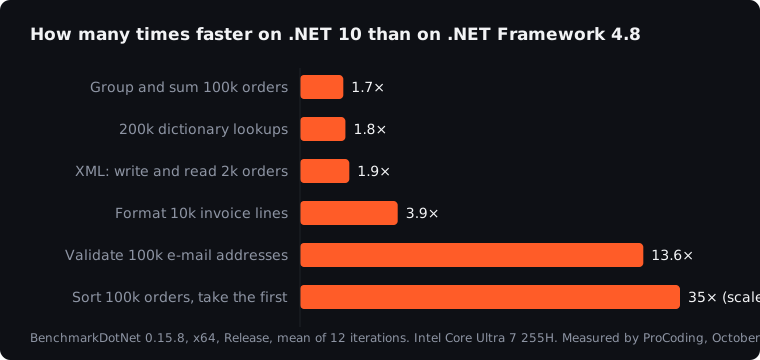
| Operation | .NET Framework 4.8 | .NET 8 | .NET 10 | .NET 10 vs 4.8 |
|---|---|---|---|---|
| Group and sum 100,000 orders | 12.7 ms | 7.5 ms | 7.4 ms | 1.7× faster |
| Sort 100,000 orders, take the first | 21.9 ms | 0.77 ms | 0.63 ms | 35× faster |
| 200,000 dictionary lookups | 31.9 ms | 17.7 ms | 17.8 ms | 1.8× faster |
| Format 10,000 invoice lines | 3.6 ms | 1.05 ms | 0.94 ms | 3.9× faster |
| Validate 100,000 e-mail addresses | 70.5 ms | 5.6 ms | 5.2 ms | 13.6× faster |
| Write and read 2,000 orders as XML | 5.7 ms | 3.2 ms | 2.9 ms | 1.9× faster |
Memory moved in the same direction. Formatting the invoice lines allocated 41 % less memory on .NET 10, the XML round trip 36 % less, and the sort went from 3.6 MB of allocations to almost nothing.
Why it got faster
None of this came from changing our code. It came from three places in .NET itself:
- A better JIT compiler. Modern .NET compiles hot code twice: quickly at first, then again with optimisations based on how the code actually runs (dynamic profile-guided optimisation). Plain loops and LINQ benefit without anyone noticing.
- A rewritten regular expression engine. Regex in modern .NET was rebuilt for speed. Our e-mail validation went from 70 ms to 5 ms, the biggest gain in ordinary code.
- Smarter libraries. The 35× in sorting is not the CPU working faster. LINQ in modern .NET recognises that
OrderBy(...).First()only needs the smallest element and finds it without sorting all 100,000 orders. On .NET Framework, the whole list is sorted first.
That last point is worth remembering: some of the biggest gains come from the libraries doing less work, not from faster hardware or a faster runtime.
.NET 8 or .NET 10?
Between .NET 8 and .NET 10, the differences in our test were between 0 and 18 %, sometimes within the measurement noise. If you are on .NET 8, the reason to move to .NET 10 is support, which ends on 10 November 2026, not speed. That is covered in our article on .NET 8 and 9 end of support.
We left the .NET 11 release candidate out of the table, because the benchmark tool could not yet run it the same way as the others. We will add the final release when it is out in November.
What it means for a business
Faster code does not automatically mean a faster application. A typical web request spends much of its time waiting for the database, the network or another system, and those waits do not change with the .NET version. But the work the server does itself does get faster:
- Reports and exports that crunch data in memory finish sooner.
- Imports and nightly jobs that validate, transform and match data run in a fraction of the time.
- The same server handles more users, which in the cloud can mean a smaller, cheaper plan.
- Old integrations that serialise XML cost less CPU per call.
If your .NET Framework application is slow because of database queries, a migration alone will not fix that. Our article on why applications get slow shows where to look first.
Should you migrate for speed alone?
Rarely. A migration from .NET Framework is real work, and speed is usually a welcome side effect, not the reason. The reasons are usually:
- Support and security. .NET Framework 4.8 is supported as part of Windows, but it gets no new features, and the rest of the ecosystem has moved on.
- People. Developers want to work on modern .NET, and it is harder every year to hire for old code.
- Hosting. Modern .NET runs on Linux, in containers and in cheaper cloud plans.
But when a system processes large amounts of data, imports, reports or validations, the speed difference can pay for a good part of the migration through smaller servers and shorter nightly runs. How to plan it is in our article on migrating from .NET Framework to .NET 10.
Questions we hear most
Will my application be this much faster?
Not as a whole. These numbers are for the work the CPU does in your code. If most of the time goes to waiting for the database, the overall gain will be smaller. The best way to know is to measure your own slowest operations before and after.
Do we have to change the code to get the speed-up?
For most of it, no. Our test code was identical on all three versions. The gains came from the runtime and the libraries. Some further gains are available with newer APIs, but that is optional.
Is the test fair to .NET Framework?
We used the same source code, the same data and the same machine for all three, and the standard benchmarking tool. We did not use anything that only exists in modern .NET. If anything, it is the most favourable setup for .NET Framework, because code written for modern .NET would use faster APIs.
Can we see the code?
The code is short, and we are happy to send it. Ask in the free call, or run the same idea on your own slowest operations.
How we work
This is exactly what we do. ProCoding is a .NET studio in Split, Croatia, and we move .NET Framework applications to modern .NET one piece at a time, measuring before and after so you see what the move bought you. More on our .NET and Blazor work. The first step is a free 30-minute call.
Sources
- BenchmarkDotNet, the benchmarking tool we used
- Performance improvements in .NET 10, .NET Blog, Microsoft
- Regular expression improvements in .NET 7, .NET Blog, Microsoft
- Runtime configuration options for compilation, Microsoft Learn (tiered compilation and profile-guided optimisation)
- Our own measurements, October 2026, as described above
This article is general information only, not legal, tax, financial or other professional advice. Scenarios, examples and calculations are illustrative. Terms of use and disclaimer.