We measured the five most common EF Core mistakes: how much each one really costs
N+1, whole entities, tracking, queries in loops, filtering in memory: we benchmarked each EF Core 10 mistake against its fix. Up to 9x slower, 700x the memory.

Vlado Pandžić · Founder · Senior .NET architect
Published · 8 min read
Contents
- How we measured
- The results
- 1. Filtering after ToList(): 9× slower, 700× the memory
- 2. Whole entities for a list: 2.4× slower, 12× the memory
- 3. N+1: 1.9× slower here, much worse over a network
- 4. A query in a loop: 1.8× slower, and the same network problem
- 5. Tracking a list nobody changes: 1.5× slower
- Why the numbers are a lower bound
- How to find them in your application
- Questions we hear most
- How we work
Every .NET developer has heard the advice: avoid N+1, use AsNoTracking, do not load whole entities. What is usually missing is the number. How much slower is the mistake, really? Enough to matter, or is it something to fix one day?
So we measured it. Five mistakes we see again and again in EF Core applications, each next to its fix, on the same data, with the standard benchmarking tool.
The short answer: the worst one, filtering after ToList(), was 9 times slower and used 700 times the memory. The mildest, tracking a read-only list, still cost 46 % more time. And the two mistakes that look the most innocent, N+1 and queries in a loop, get much worse on a real database server than our numbers show.
How we measured
- EF Core 10 on .NET 10, with SQLite as a database file on disk.
- The data: 1,000 customers, 10,000 orders with a 2 KB notes field, and 50,000 order lines. A quarter of the orders are open.
- The tool: BenchmarkDotNet 0.15.8, with 3 warm-up and 12 measured iterations per case, and memory allocations recorded.
- Each case opens a new
DbContext, as a web request would. - The machine: a laptop with an Intel Core Ultra 7 255H.
One important limitation: SQLite runs inside the application process, so every query is a function call, not a trip over the network. On SQL Server or Azure SQL, every extra query also costs a network round trip. We come back to that below, because it changes the picture for two of the five.
The results
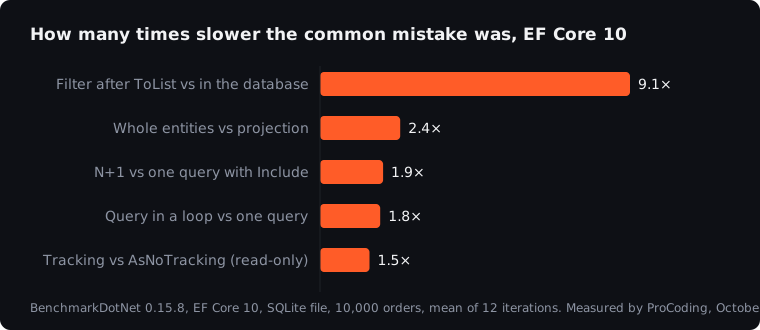
| Mistake | Time | The fix | Time | Slower | Memory |
|---|---|---|---|---|---|
Filter after ToList(), in memory |
91.4 ms | Filter in the database | 10.0 ms | 9.1× | 43.6 MB vs 0.06 MB |
| Whole entities for a list | 22.5 ms | Projection to the needed columns | 9.6 ms | 2.4× | 12.7 MB vs 1.0 MB |
| N+1: lines loaded per order | 3.5 ms | One query with Include |
1.9 ms | 1.9× | 1.8 MB vs 0.8 MB |
| One query per customer in a loop | 19.3 ms | One query for all customers | 10.9 ms | 1.8× | 2.6 MB vs 0.3 MB |
| Read-only list with tracking | 27.1 ms | AsNoTracking |
18.6 ms | 1.5× | 13.3 MB vs 10.9 MB |
Now each one in turn, with the code.
1. Filtering after ToList(): 9× slower, 700× the memory
The classic: a ToList() in the wrong place, and the filter runs in C# instead of SQL.
var open = db.Orders.ToList()
    .Where(o => o.Status == "Open" && o.Total > 500)
    .Count();
The database sends all 10,000 orders, with their 2 KB notes, and the application throws most of them away. The fix lets the database do the work:
var open = db.Orders.Count(o => o.Status == "Open" && o.Total > 500);The mistake allocated 43.6 MB for one call; the fix, 62 KB. On a web server, that difference is the garbage collector working hard under every request, and it grows with the table. It usually sneaks in through a method that returns List<T> or IEnumerable<T> instead of IQueryable<T>, so the filter is added after the data has already arrived.
2. Whole entities for a list: 2.4× slower, 12× the memory
A list screen needs four columns. The code loads complete entities, including a large text field nobody shows:
var rows = db.Orders.AsNoTracking()
    .Include(o => o.Customer)
    .Where(o => o.Status == "Open")
    .ToList()
    .Select(o => new OrderRow(o.Id, o.Customer.Name, o.Date, o.Total));
A projection asks the database only for what the screen needs:
var rows = db.Orders
    .Where(o => o.Status == "Open")
    .Select(o => new OrderRow(o.Id, o.Customer.Name, o.Date, o.Total))
    .ToList();
12.7 MB became 1 MB. The wider the table, and every table gets wider over the years, the bigger the gap. Projections are also never tracked, so they get the benefit of the last point for free.
3. N+1: 1.9× slower here, much worse over a network
One query for the orders, then one more for the lines of each order:
var orders = db.Orders.OrderBy(o => o.Id).Take(100).ToList();
foreach (var order in orders)
    total += db.OrderLines.Count(l => l.OrderId == order.Id);
That is 101 queries. With Include, it is one:
var orders = db.Orders.OrderBy(o => o.Id).Take(100)
    .Include(o => o.Lines)
    .ToList();
In our test, the difference was 1.6 ms. That sounds harmless, but SQLite had no network. On SQL Server in the same data centre, a round trip typically takes somewhere around half a millisecond to a couple of milliseconds. A hundred extra round trips then add roughly 50 to 200 ms to every page that does this, and the page with 100 rows today has 1,000 next year.
4. A query in a loop: 1.8× slower, and the same network problem
The same pattern in a different shape: a loop over customers, one query each.
foreach (var id in customerIds)
    count += db.Orders.Count(o => o.CustomerId == id && o.Status == "Open");
One query does the same job:
var count = db.Orders.Count(o => customerIds.Contains(o.CustomerId) && o.Status == "Open");Locally, 200 queries against one cost 1.8× the time and 7.7× the memory. Over a network, the 200 round trips add the same 0.1 to 0.4 seconds as in N+1. Loops like this hide in imports, background jobs and reports, which is why nightly runs grow from minutes to hours.
5. Tracking a list nobody changes: 1.5× slower
By default, EF Core keeps a copy of every loaded entity to detect changes. For a screen that only displays data, that is wasted work:
var orders = db.Orders.Where(o => o.Status == "Open").ToList();var orders = db.Orders.AsNoTracking().Where(o => o.Status == "Open").ToList();46 % slower and 2.4 MB more memory, on every load of a list. It is the mildest of the five, and the easiest to fix: one call, or QueryTrackingBehavior.NoTracking as the default for a read-only context.
Why the numbers are a lower bound
Two of the five mistakes, N+1 and queries in a loop, are mostly about the number of round trips. Our setup removed the network entirely, so it shows only the cost inside the application. A rough guide for a real server:
| Extra queries per page | At 0.5 ms per round trip | At 2 ms per round trip |
|---|---|---|
| 10 | +5 ms | +20 ms |
| 100 | +50 ms | +200 ms |
| 1,000 | +0.5 s | +2 s |
The other three mistakes, filtering in memory, whole entities and tracking, are about how much data travels and how much memory it takes. A network makes them worse too, because every unnecessary megabyte has to cross it.
How to find them in your application
- Look at the SQL. Enable EF Core logging with
LogTo(Console.WriteLine)in development, or callToQueryString()on a query, and count the queries per page. - Look for
ToList()andAsEnumerable()followed byWhere,CountorFirst, and for methods that returnList<T>from a repository. - Look for loops that contain a query, including the hidden ones in lazy-loaded navigation properties.
- Measure the slowest screens before and after a fix, as we did here. The fix that matters is the one that moves the number.
The full list of causes, including the ones we did not benchmark here, such as missing indexes and pagination that gets slower and slower, is in our article on why EF Core is slow.
Questions we hear most
Is EF Core itself slow?
Not in our experience. In all five cases, the fix was still EF Core, just used differently. Most slow EF Core applications are slow because of how queries are written, not because of the library.
Should we use Dapper or raw SQL instead?
For a handful of very hot queries, it can make sense. For the rest, the fixes above get most of the gain while keeping one way of accessing data. Rewriting the data layer is rarely the first step.
Do these results hold on SQL Server?
The direction does, and for N+1 and loops the gaps get bigger because of the network. The exact milliseconds depend on your server, your data and your indexes. That is why it is worth measuring your own slowest screens.
We are still on EF6. Does this apply?
The same mistakes exist in EF6, and the fixes are similar. Moving to EF Core is a separate project, covered in our article on EF6 to EF Core migration.
For applications still on EF6, we measured the same kind of queries on EF6 and EF Core 10 side by side in EF6 vs EF Core 10 performance.
How we work
This is exactly what we do. ProCoding is a .NET studio in Split, Croatia, and EF Core performance is where we spend much of our time: finding the queries that cost the most, fixing them with measurements before and after, and making sure the data layer keeps up as the data grows. On your own, with your team, or with a freelance .NET developer inside your team. The first step is a free 30-minute call.
Sources
- BenchmarkDotNet, the benchmarking tool we used
- Efficient querying, Microsoft Learn
- Tracking vs. no-tracking queries, Microsoft Learn
- Simple logging in EF Core, Microsoft Learn
- Our own measurements, October 2026, as described above
This article is general information only, not legal, tax, financial or other professional advice. Scenarios, examples and calculations are illustrative. Terms of use and disclaimer.