EF6 vs EF Core 10: we ran the same queries on both, and measured
We benchmarked EF6 on .NET Framework 4.8 and .NET 10 against EF Core 10 on SQL Server: lookups, lists, Include, inserts, updates. Up to 17x faster.

Vlado Pandžić · Founder · Senior .NET architect
Published · 9 min read
Contents
“Is EF Core really faster, or is that just what the release notes say?” It is the question every team with an old Entity Framework 6 application asks before deciding whether the migration is worth it. Microsoft publishes benchmarks, but they rarely look like the queries in a real order or invoicing system.
So we wrote the queries such a system contains, and ran exactly the same ones on three setups: EF6 on .NET Framework 4.8, where most EF6 applications still live, EF6 on .NET 10, which is possible since EF 6.4, and EF Core 10 on .NET 10. Same database, same data, same entity classes.
The short answer: EF Core 10 was 1.6 to 17 times faster than EF6 on .NET Framework, and used up to 28 times less memory. The biggest gap was in saving data, not reading it. And EF6 on .NET 10 turned out to be a useful middle step: faster than on .NET Framework, without touching a single query.
How we measured
- The database: SQL Server (LocalDB) on the same machine, with 1,000 customers, 10,000 orders with a 2 KB notes field, and 50,000 order lines. A quarter of the orders are open.
- The same entity classes for all three setups, mapped to the same tables. EF6 6.5.1 and EF Core 10.
- The tool: BenchmarkDotNet 0.15.8, with 3 warm-up and 12 measured iterations per case, and memory allocations recorded.
- Each case opens a new context, as a web request would. Inserts and updates run in a transaction that is rolled back, so every iteration sees the same data.
- The machine: a laptop with an Intel Core Ultra 7 255H.
The seven operations:
| Operation | What it stands for |
|---|---|
| 100 lookups by id, one at a time | Loading records one by one in a screen or an import |
| Load 2,500 open orders, no tracking | A read-only list or report |
| Load 2,500 open orders, tracked | The same list, the way most older code loads it |
| Project open orders to a small class | A list screen done properly |
Load 100 orders with their lines (Include) |
An order detail or an export |
| Insert 500 orders | An import or a batch job |
| Load and update 200 orders | A bulk price change |
The results
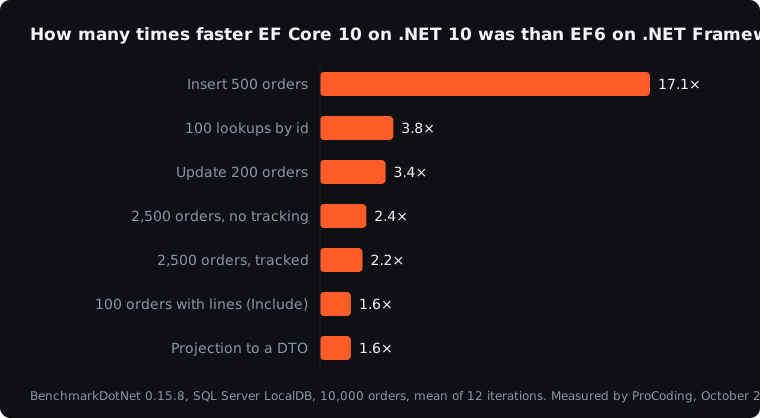
| Operation | EF6, .NET Framework 4.8 | EF6, .NET 10 | EF Core 10 | EF Core 10 vs EF6 on 4.8 |
|---|---|---|---|---|
| 100 lookups by id | 30.2 ms | 17.1 ms | 8.0 ms | 3.8× faster |
| 2,500 orders, no tracking | 58.3 ms | 44.0 ms | 24.4 ms | 2.4× faster |
| 2,500 orders, tracked | 87.6 ms | 59.3 ms | 40.5 ms | 2.2× faster |
| Projection to a small class | 9.0 ms | 5.5 ms | 5.8 ms | 1.6× faster |
| 100 orders with lines | 17.4 ms | 13.6 ms | 11.1 ms | 1.6× faster |
| Insert 500 orders | 272.0 ms | 127.7 ms | 15.9 ms | 17× faster |
| Update 200 orders | 22.4 ms | 18.7 ms | 6.6 ms | 3.4× faster |
Memory moved in the same direction, and in some cases much further:
| Operation | EF6, .NET Framework 4.8 | EF Core 10 |
|---|---|---|
| 100 lookups by id | 7.1 MB | 1.6 MB |
| 2,500 orders, no tracking | 31.2 MB | 10.8 MB |
| 2,500 orders, tracked | 37.3 MB | 13.2 MB |
| Insert 500 orders | 153.6 MB | 5.4 MB |
| Update 200 orders | 8.6 MB | 2.5 MB |
One honest note: the insert numbers for EF6 varied between runs, from about 250 to 330 ms on .NET Framework. The table shows the final run. The gap to EF Core was over 15 times in every run.
Saving data: where the gap is biggest
The insert is the most striking number, and it is worth understanding, because it is also where many EF6 applications lose the most time in imports and nightly jobs.
for (var i = 0; i < 500; i++)
    db.Orders.Add(new Order { CustomerId = 1, Date = DateTime.Today, Total = 10m, Status = "New" });
db.SaveChanges();
The same code on both. Two things make EF6 slow here:
- EF6 sends one
INSERTper row. 500 orders are 500 separate commands to the database. EF Core groups them into a few batched commands. On a real server over a network, every one of those 500 round trips adds latency, so the gap only grows. - EF6 checks all tracked entities on every
Add. Each call runs change detection over everything already in the context, so adding many entities gets slower the more there are.
The second one has a cheap fix in EF6 itself, and it is worth knowing even if you never migrate:
db.Orders.AddRange(orders);
db.SaveChanges();
With AddRange, the same insert in EF6 took 80.9 ms instead of 272 ms on .NET Framework, and allocated 21 MB instead of 154 MB. Still five times slower than EF Core, because the one-insert-per-row remains, but a 3× gain for changing one line. If your EF6 application has an import that adds rows in a loop, start there.
Updates follow the same pattern. EF Core sends the 200 updates in batches and its change tracker does less work per entity, which shows up as 3.4 times the speed and a third of the memory.
Reading data: steady gains, and one surprise
For reads, EF Core 10 was 1.6 to 3.8 times faster. The largest gain was in many small queries: 100 lookups by id took 30 ms on EF6 and 8 ms on EF Core. Each query in EF Core has much less overhead in translating and executing it, which matters in code that runs many small queries, such as screens that load related data one record at a time.
The surprise was the projection. When the query selects only the columns a screen needs, EF6 on .NET 10 was as fast as EF Core 10: 5.5 ms against 5.8 ms. Most of the work there is in the database, and both send it a similar SQL query. Projection is good advice on any version, as our article on the five most common EF Core mistakes also showed.
EF6 on .NET 10: a useful middle step
Many teams think of the migration as one big step: from .NET Framework with EF6 to .NET 10 with EF Core. It does not have to be. EF6 has run on modern .NET since version 6.4, and in our measurements simply moving it to .NET 10 made it 1.2 to 2.1 times faster, without changing any query.
That opens a two-step path:
- Step 1Move the application to .NET 10, keep EF6
- Step 2Replace EF6 with EF Core, part by part
The first step gets you a supported runtime and part of the speed. The second can then happen gradually, starting with the parts that save the most data or run the most queries. EF6 on modern .NET needs its configuration in code instead of app.config, which takes a few lines:
public class Ef6Configuration : DbConfiguration
{
    public Ef6Configuration()
    {
        SetProviderServices(SqlProviderServices.ProviderInvariantName, SqlProviderServices.Instance);
        SetProviderFactory(SqlProviderServices.ProviderInvariantName, SqlClientFactory.Instance);
    }
}
There are limits: the EF6 designer does not work directly in modern .NET projects, so models built from EDMX files need extra work, and EF6 is stable and supported but no longer actively developed. It is a bridge, not a destination. The full move, and what makes it harder or easier, is in our article on EF6 to EF Core migration.
What this means in practice
A few milliseconds per query sound small. They add up in the places businesses actually feel:
- Imports and nightly jobs. An import of 50,000 rows that inserts in a loop is where the 17× shows up as hours turning into minutes.
- Busy screens. A screen that runs 100 small queries per load is 22 ms faster per user, every time, and the server does a quarter of the allocation work.
- Server costs. Less memory per request means fewer garbage collections and more requests per server, which matters when you pay for every instance in Azure.
And the numbers are a lower bound in one way: our database ran on the same machine, so there was no network. On a real SQL Server or Azure SQL, every round trip EF6 makes that EF Core avoids also costs network latency.
How much faster ordinary business code runs on .NET 10 than on .NET Framework, without any database, is in our measurement of .NET Framework 4.8 vs .NET 10.
Questions we hear most
Is it worth migrating from EF6 to EF Core just for performance?
Usually not for performance alone. But performance is rarely the only reason: EF6 gets no new features, and it ties many applications to .NET Framework. If you are moving to .NET 10 anyway, EF Core is where the data layer should end up. Start with the parts that save the most data.
Can we just run EF6 on .NET 10?
Yes, since EF 6.4. Applications whose model was built in the EF6 designer from an EDMX file need some extra work first. In our measurements it was 1.2 to 2.1 times faster than on .NET Framework. It is a good first step, but not a long-term home.
Do these results hold on a real SQL Server?
The direction does. The exact milliseconds depend on your server, your data and your indexes. For inserts and updates the gap gets bigger over a network, because EF6 makes many more round trips. That is why it is worth measuring your own slowest operations before and after.
Our EF6 import is slow. What is the quickest win?
Replace Add in a loop with one AddRange, or turn off automatic change detection during the import. In our test that alone made the EF6 insert three times faster.
How we work
This is exactly what we do. ProCoding is a .NET studio in Split, Croatia, and we move .NET Framework applications and their EF6 data layers to .NET 10 and EF Core: measuring first, migrating in steps the business does not notice, and checking every step with numbers. On your own, with your team, or with a freelance .NET developer inside your team. The first step is a free 30-minute call.
Sources
- BenchmarkDotNet, the benchmarking tool we used
- Port from EF6 to EF Core, Microsoft Learn
- Compare EF Core and EF6, Microsoft Learn
- Efficient updating, Microsoft Learn
- Our own measurements, October 2026, as described above
This article is general information only, not legal, tax, financial or other professional advice. Scenarios, examples and calculations are illustrative. Terms of use and disclaimer.